
What Is Bookkeeping?
Bookkeeping is the process of recording, organizing, and maintaining all of your business's financial transactions — every dollar that comes in and every dollar that goes out.
Done properly, bookkeeping gives you: - A real-time view of your business's financial health - Accurate HST/GST amounts for CRA filing - The records your accountant needs to file your tax return - Documentation to defend any CRA audit - Data to make informed business decisions
Bookkeeping is not accounting. Bookkeeping is the ongoing, operational recording of transactions. Accounting (done by an accountant) is the analysis, tax filing, and strategic advice that comes from those records.
---
Step-by-Step: How to Do Small Business Bookkeeping in Canada
Step 1: Open a Separate Business Bank Account
This is the single most important step. Never mix personal and business finances. A dedicated business chequing account: - Makes it easy to identify business income and expenses - Simplifies HST tracking (all taxable purchases flow through one account) - Protects you in a CRA audit (personal purchases don't muddy the picture) - Is required for professional bookkeeping (bank feeds connect automatically)
Most Canadian banks offer free or low-cost business chequing accounts. Open a business credit card as well — put all business purchases on it.
Step 2: Choose Accounting Software
Three solid options for Canadian small businesses:
QuickBooks Online ($30–$90/month): Industry standard. Used by most Canadian accountants. Built-in HST/GST filing, payroll, bank feeds, and CRA-ready reports. Best for most businesses.
Xero ($32–$90/month): Clean interface, excellent bank feeds, strong reporting. Good alternative to QuickBooks.
Wave (Free): Suitable for very small businesses — under $200K revenue, no employees. Limited support and fewer features than QuickBooks/Xero.
Step 3: Set Up Your Chart of Accounts
Your chart of accounts is the list of categories you use to record transactions. A standard Canadian small business chart includes:
- ●Income: Sales Revenue, Service Revenue, Other Income
- ●Cost of Goods Sold: Purchases, Freight, Inventory Adjustments
- ●Operating Expenses: Rent, Utilities, Phone, Internet, Software, Marketing, Professional Fees, Insurance, Vehicle, Meals (50% deductible)
- ●Payroll: Salaries, CPP Expense, EI Expense
- ●Tax Accounts: HST Payable, HST Receivable (ITCs)
- ●Balance Sheet: Bank Accounts, A/R, A/P, Credit Cards, Shareholder Loan, Owner's Equity
Your bookkeeper or accountant can set up your chart of accounts to match CRA's T2 return categories — making year-end filing much simpler.
Step 4: Record All Income
Every dollar that comes into your business must be recorded: - Customer invoices when paid - E-transfer receipts - Cash payments - Online sales (Shopify, Amazon, etc.) - Grants and subsidies
In QuickBooks Online, you can create invoices, record payments, and connect your Stripe/PayPal to automatically import transactions.
Step 5: Record All Expenses
Every business expense must be recorded with the correct category: - Scan receipts and attach them to transactions (QuickBooks has a mobile app for this) - Import credit card and bank transactions via bank feeds - Code each transaction to the correct expense account - Note: meals are 50% deductible in Canada; vehicle expenses require a mileage log
Keep every receipt. CRA requires supporting documentation for all deductions.
Step 6: Reconcile Bank Accounts Monthly
Bank reconciliation compares your accounting software records to your actual bank statement. Discrepancies may indicate: - Missing transactions (not recorded in the books) - Duplicate entries - Bank errors - Fraud
Reconcile every bank account and credit card every month, within 2 weeks of month-end.
Step 7: Track HST Collected and Paid — File on Schedule
Once registered for HST, you must: - Add HST to customer invoices (in QuickBooks, enable sales tax and select the correct province/rate) - Record HST paid on business expenses as ITCs - File your HST return by the due date (quarterly for most small businesses) - Remit net HST owing (HST collected minus ITCs)
HST due dates for quarterly filers: - Q1 (Jan–Mar): Due April 30 - Q2 (Apr–Jun): Due July 31 - Q3 (Jul–Sep): Due October 31 - Q4 (Oct–Dec): Due January 31
Step 8: Run Monthly Reports
At the end of every month, run three standard reports: 1. Profit & Loss (P&L) Statement — revenue and expenses for the month and year-to-date 2. Balance Sheet — assets, liabilities, and equity at month-end 3. Cash Flow Statement — cash in and out during the month
Review these reports to understand your business's financial position. Share them with your accountant quarterly so there are no surprises at year-end.
Step 9: Send Year-End Package to Your accountant
At year-end, prepare: - Reconciled trial balance - Bank reconciliation reports - HST reconciliation (books vs. filed returns) - Payroll summary (reconciled to T4 Summary) - Fixed asset schedule with CCA calculations - Organized receipts and source documents
Your accountant uses this package to file your T2 corporate return.
---
What Bookkeeping Records Must You Keep in Canada?
CRA requires businesses to keep all records for 6 years from the end of the tax year. This includes: all invoices, receipts, bank statements, credit card statements, payroll records, and HST returns. Digital records are acceptable.
See our detailed guide: CRA Bookkeeping Requirements →
---
How Much Time Does Bookkeeping Take?
| Monthly Transaction Volume | Time Required |
|---|---|
| Under 50 transactions | 3–5 hours/month |
| 50–150 transactions | 5–10 hours/month |
| 150–300 transactions | 10–20 hours/month |
| Over 300 transactions | 20+ hours/month |
At an opportunity cost of $75–$150/hour for a business owner's time, 10 hours/month of bookkeeping equals $750–$1,500 in lost productivity — more than the $500/month cost of a professional bookkeeper.
---
DIY Bookkeeping vs. Hiring a Bookkeeper in Canada
| DIY Bookkeeping | Professional Bookkeeper | |
|---|---|---|
| Monthly cost | $30–$90 (software only) | $400–$700/month flat rate |
| Your time required | 5–20 hours/month | Zero |
| HST filing included | No (you do it) | Yes |
| CRA-ready reports | You produce them | Delivered by the 10th |
| Error risk | High | Low |
| On-time delivery | No | Yes |
| CRA audit support | Alone | Professional backup |
For most business owners, crossing the threshold where professional bookkeeping makes financial sense happens within 6–12 months of starting. If you are weighing that decision right now, should I do my own bookkeeping or hire a bookkeeper? works through the cost math and the point where handing it off pays for itself.
---
When to Stop DIY and Outsource Bookkeeping
Five clear triggers:
1. You missed an HST filing deadline — CRA penalties start immediately 2. Your books are more than 3 months behind — catch-up is expensive and stressful 3. You received a CRA letter — professional records are your best protection 4. You are applying for a business loan — lenders require clean, current financial statements 5. Your accountant charged to fix your books — this cost repeats every year without a bookkeeper
Outsource Bookkeeping: $800/month flat rate — all transactions, HST/GST filing, CRA-ready reports by the 10th, all Canadian provinces.
Book a free consultation → to get started.
Related: When Do I Need a Bookkeeper in Canada? → Related: Bookkeeping vs. Accounting in Canada →
Frequently Asked Questions
See the work before you buy it
This is what lands in your inbox by the 10th.
A 11-page management package and the matching Excel workbook — your P&L against industry targets, EBITDA with owner-pay scenarios, and a cash flow written in sentences. Read the real thing, page by page.
See the full package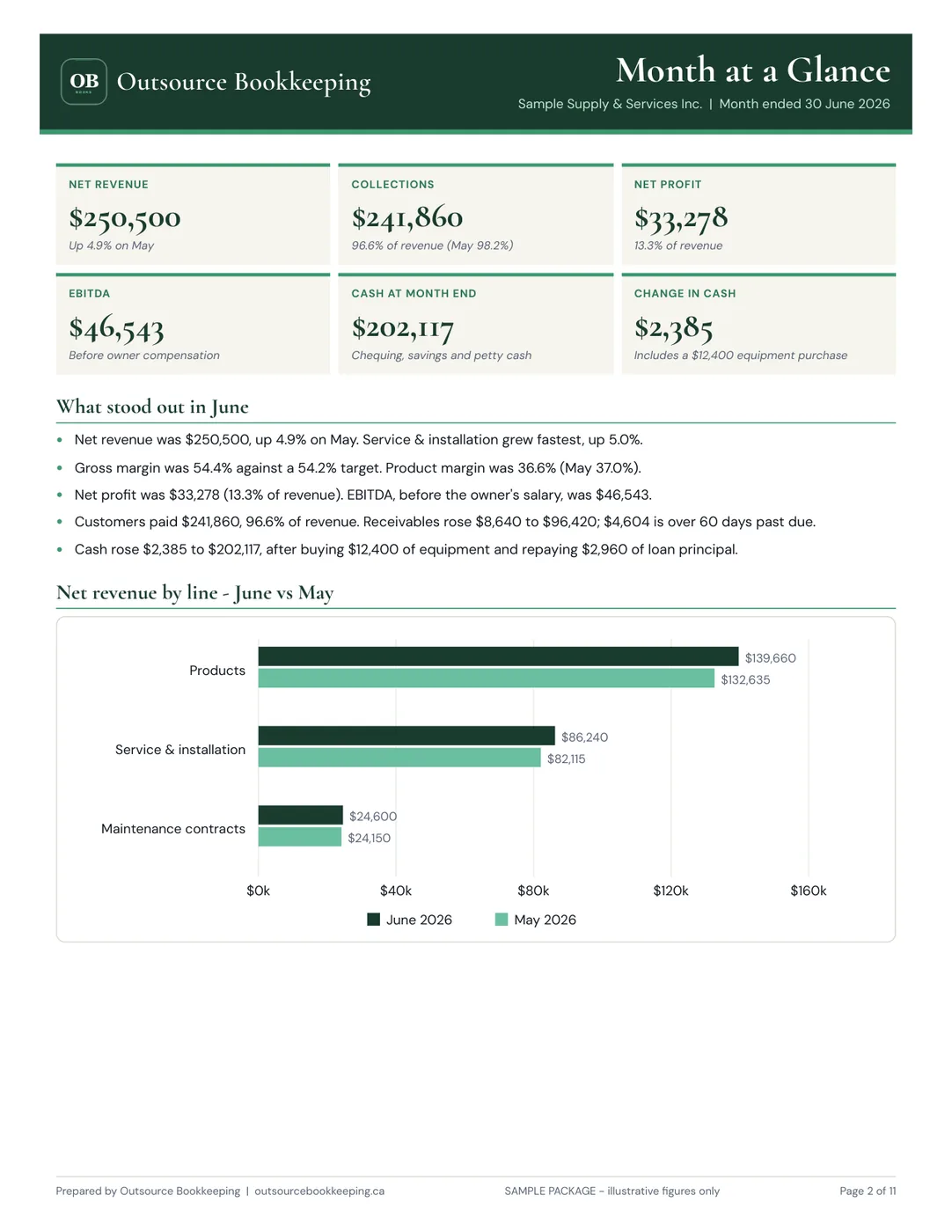
Need professional bookkeeping?
Outsource Bookkeeping delivers CRA-ready financial reports by the 10th of every month — flat rate, no surprises. See our pricing →
